
Quantity Takeoff Software
Quantity Takeoff,
Reinvented.
A faster, more accurate way to measure, price, and prove construction & MEP drawings — from the first estimate to the final bill.
The Challenge
Traditional takeoff wasn't built for how projects actually move
Paper drawings, a physical scale ruler or planimeter, and manual arithmetic for every single measurement
Quantities re-typed into a separate spreadsheet — one transcription slip away from a wrong bill
A revised drawing means re-checking everything by eye, and hoping nothing was missed
Markups on paper fade, get misplaced, or simply aren't shareable as proof
Errors don't surface until a billing dispute or a site shortage — long after the drawing left your desk
The Solution
Import the drawing. Set the scale once. Take off with a click.
QtoTakeoff measures, classifies, and totals every quantity as you mark it up — and keeps it tied to the exact drawing and sheet it came from.
Click-based takeoff
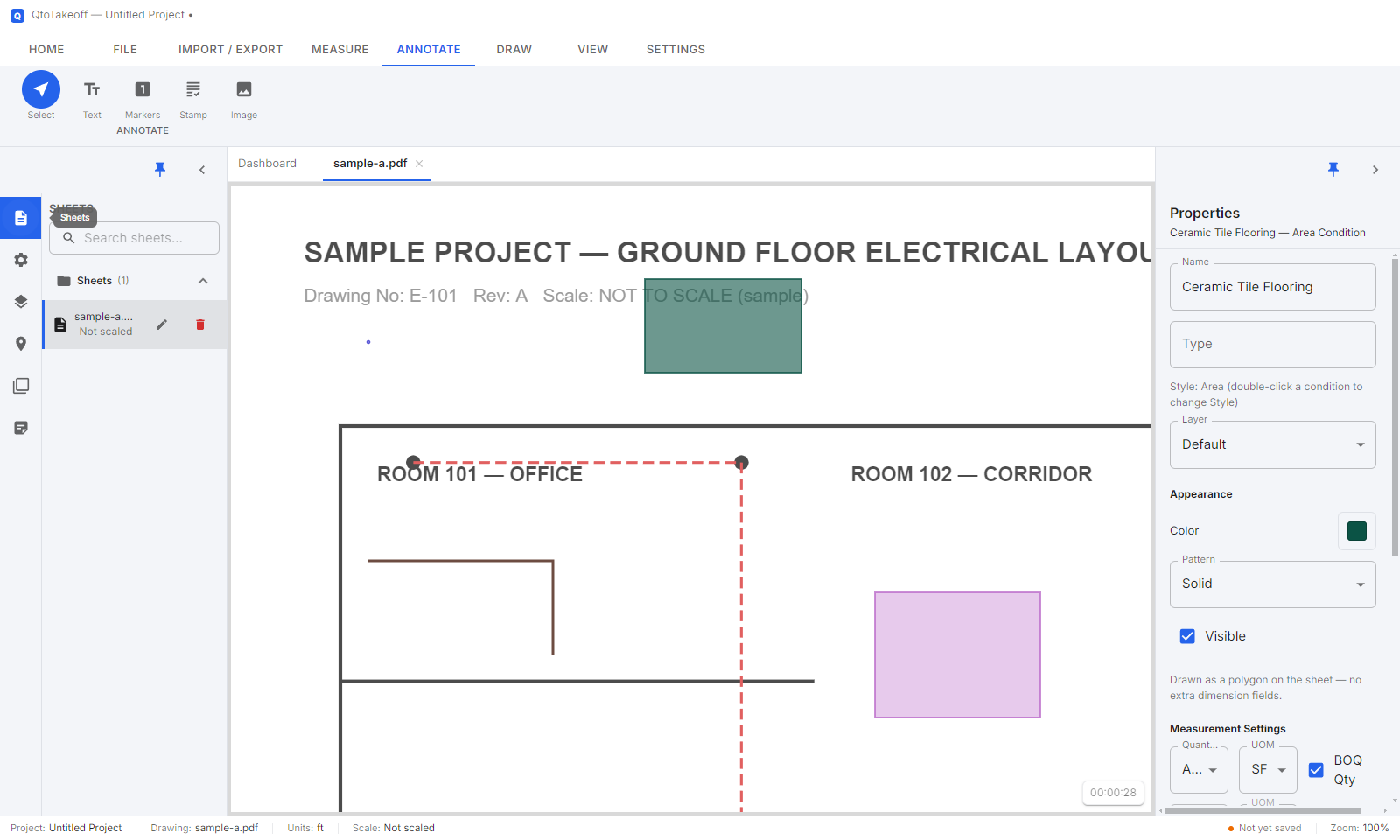
Count, Linear, Area, and Volume — placed and measured directly on the drawing.
Automatic totals
No manual arithmetic, no separate calculation step to double-check.
Visual proof
Marked-up drawings and revision comparisons anyone can verify at a glance.
One-click exports
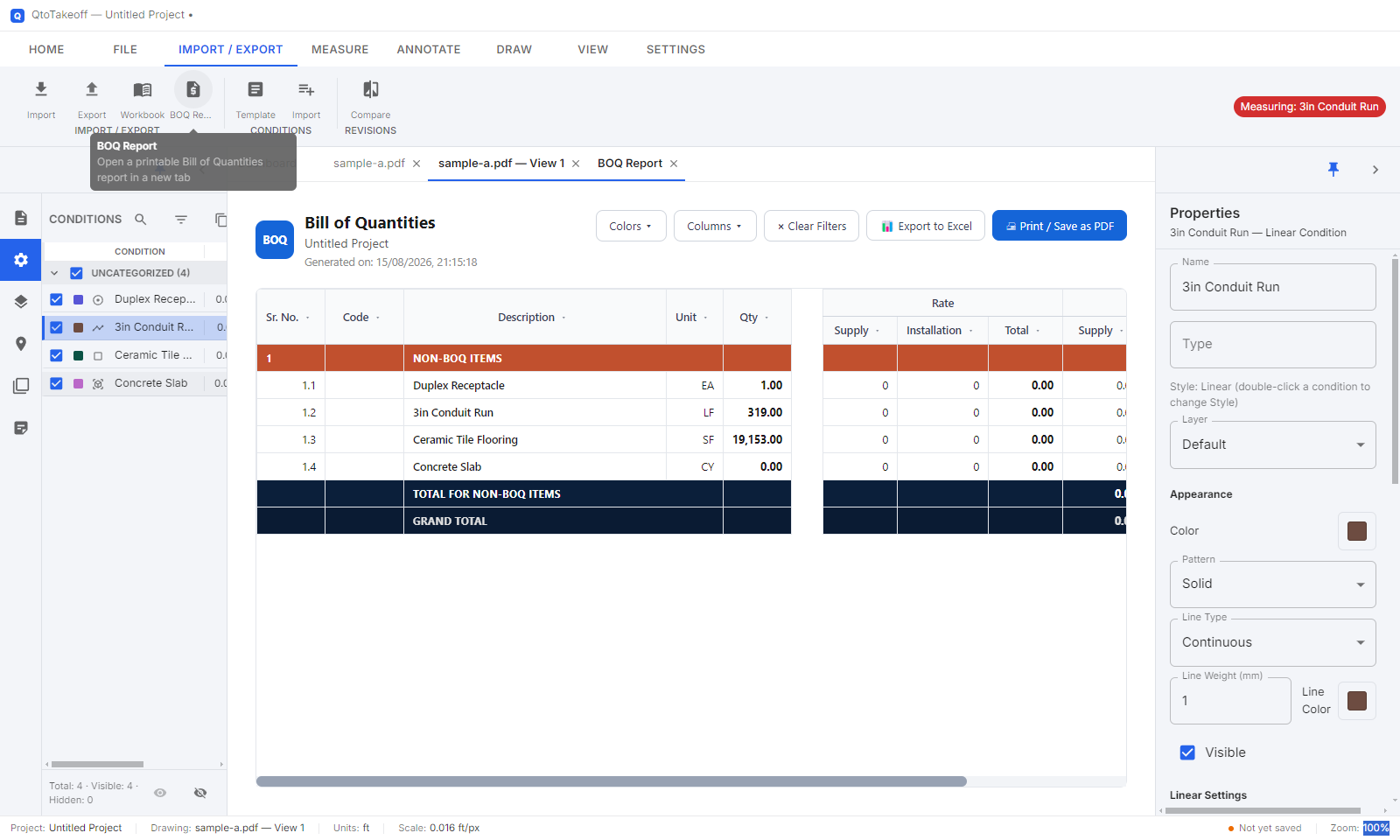
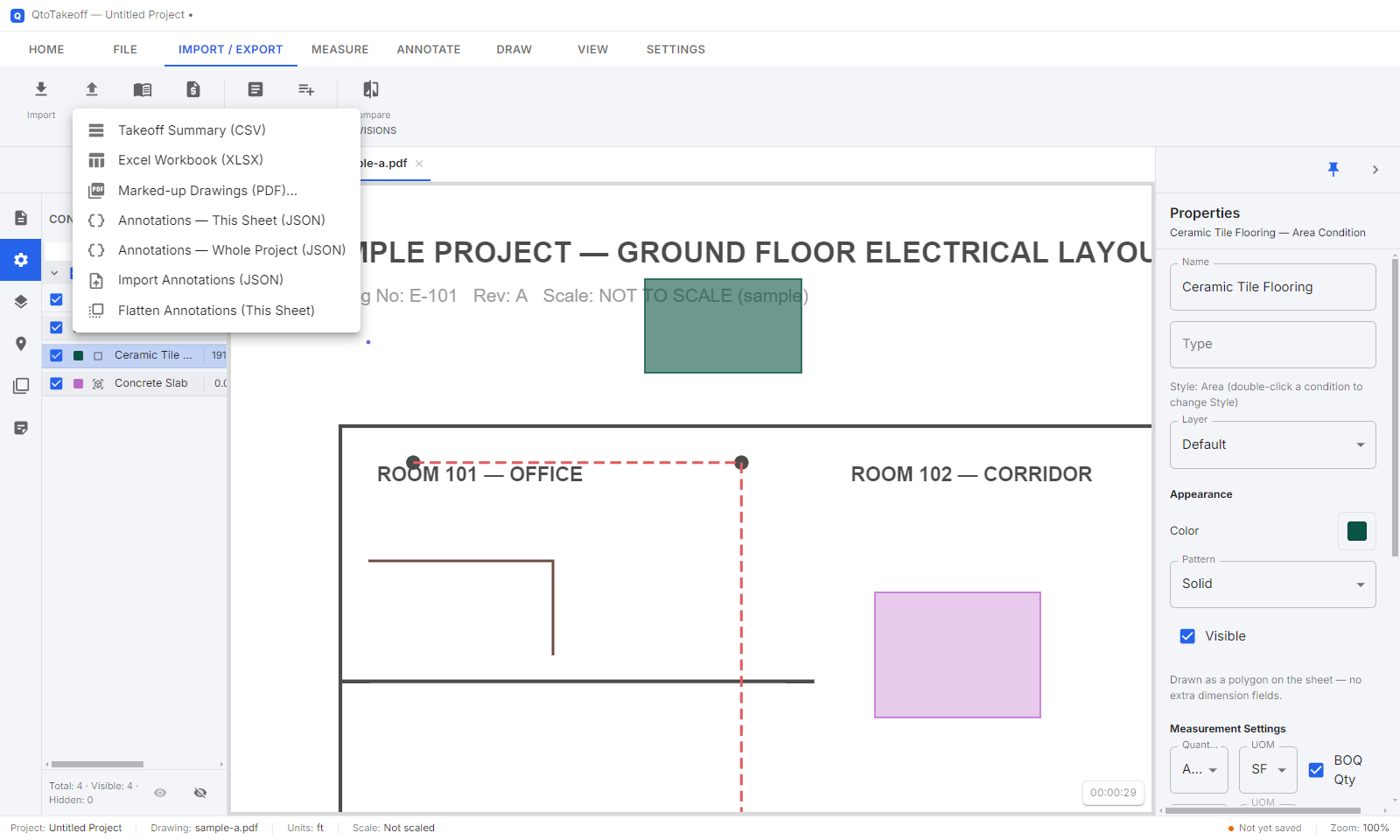
CSV, Excel, marked-up PDF, and a live Bill of Quantities.
Product Tour
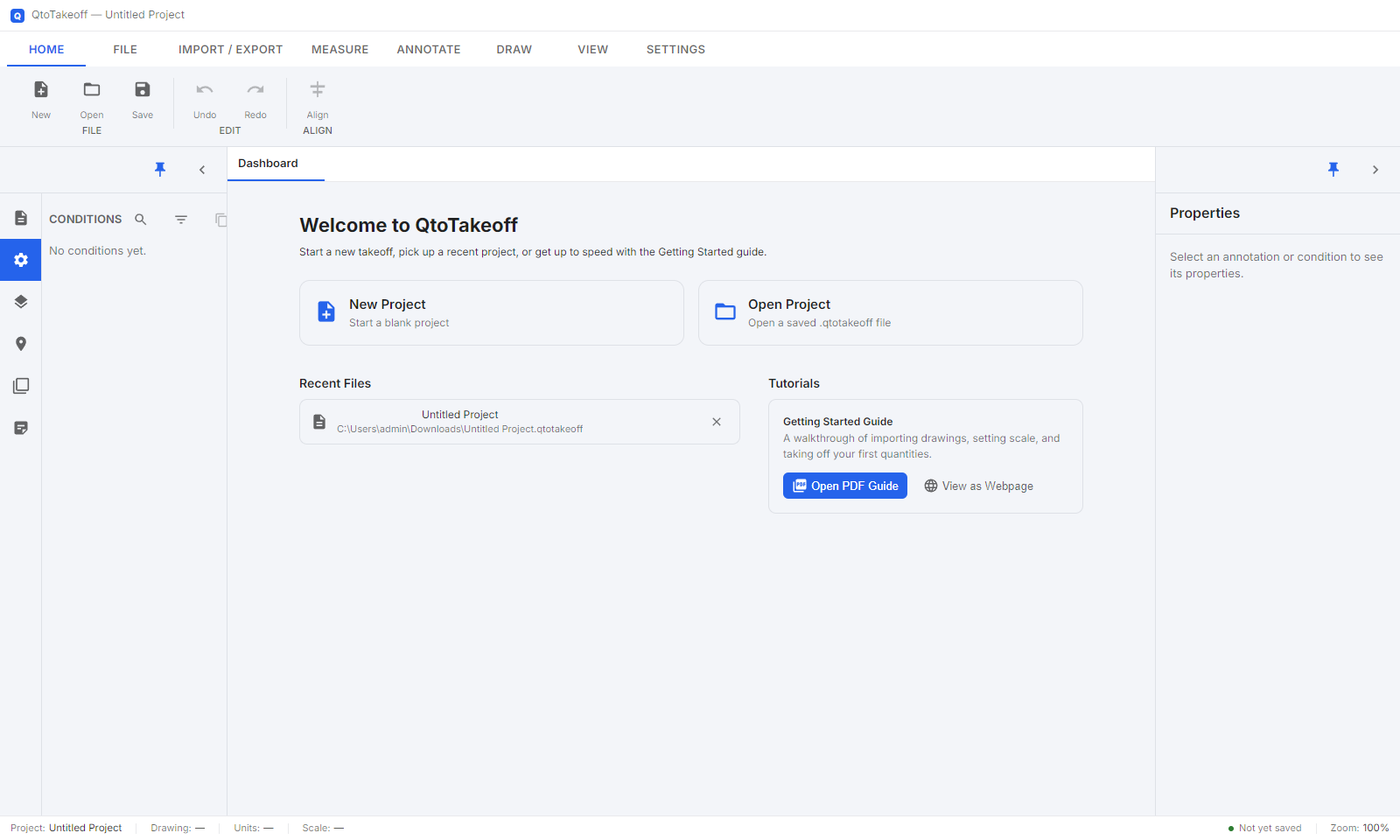
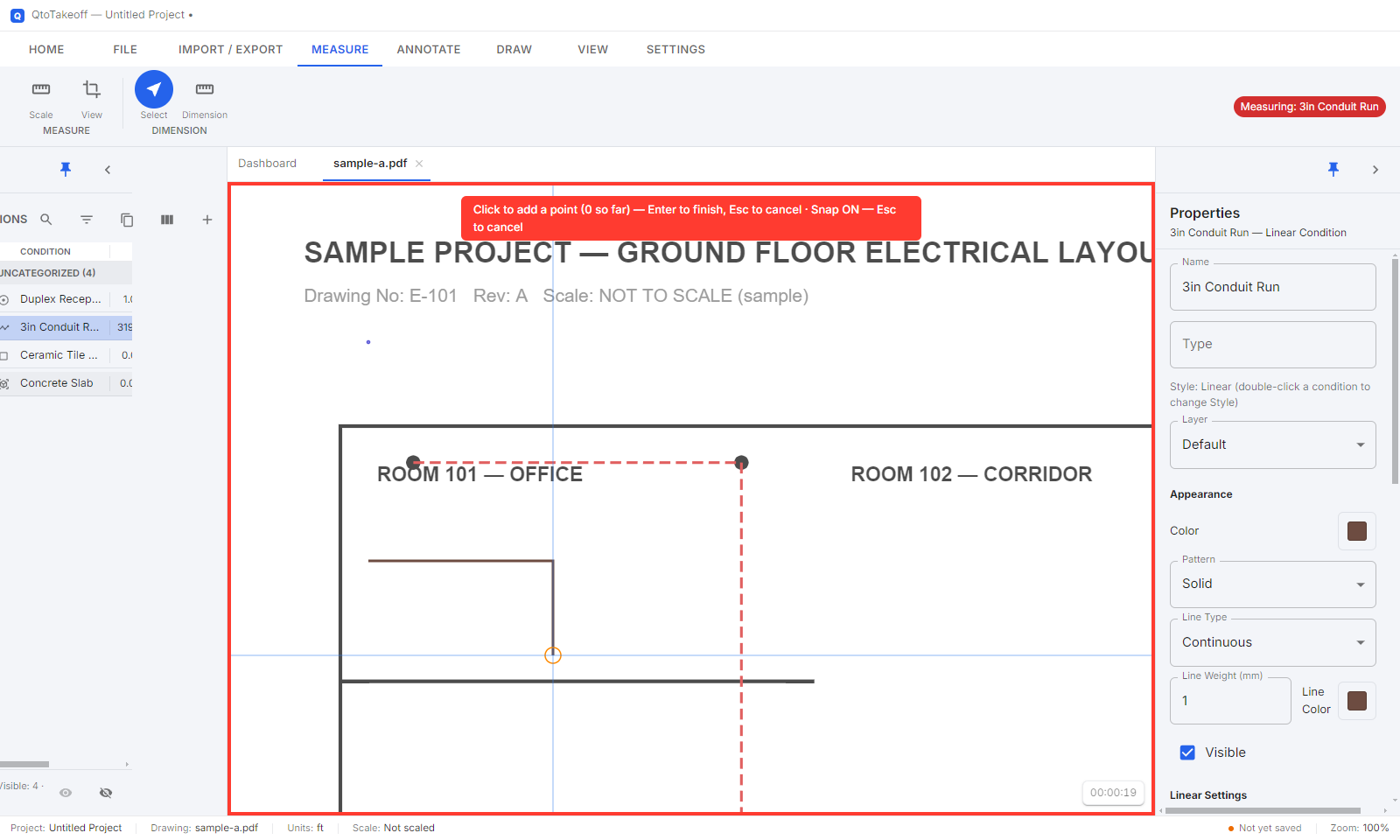
A closer look at the workspace
Screenshots of the actual app, not mockups.
Side by Side
The same work, a different way to do it
| Task | Traditional method | QtoTakeoff |
|---|---|---|
| Scaling a drawing | ✕Calculated by hand, sheet by sheet | ✓Set once per sheet; every measurement inherits it automatically |
| Counting & measuring | ✕Manual tally marks and arithmetic for every item | ✓Click or trace — count, length, area, and volume computed instantly |
| Multi-page drawing sets | ✕Re-orient and re-scale by hand, sheet by sheet | ✓Each sheet keeps its own scale and DPI automatically |
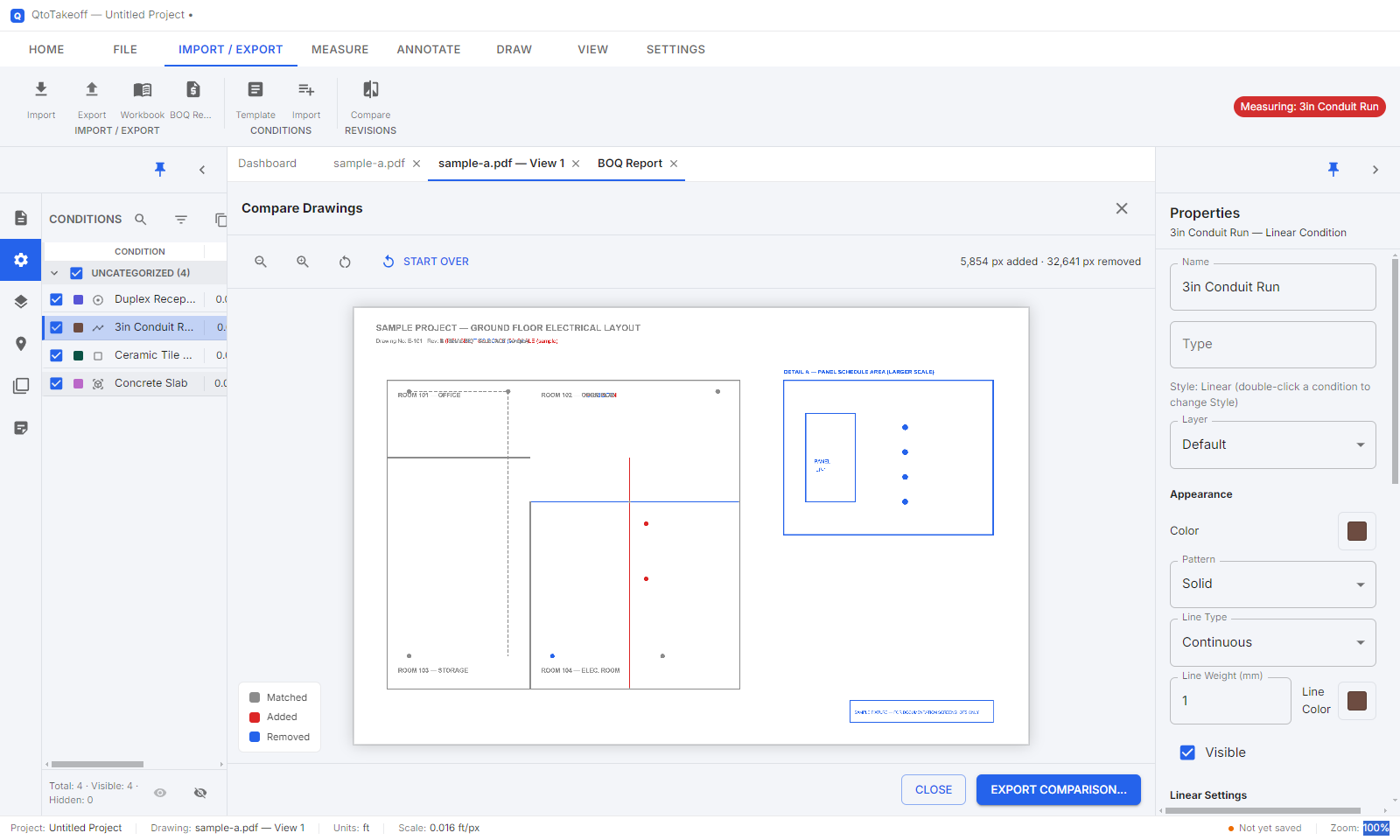
| Handling a revision | ✕"Spot the difference" by eye across two prints | ✓Drawing Compare highlights every change in red / blue |
| Preparing the BOQ | ✕Re-type quantities into Excel; re-check rates by hand | ✓Same conditions feed a live, editable BOQ Report |
| Proof for client / consultant | ✕A stack of marked-up prints, or verbal assurance | ✓Exportable marked-up PDF with every mark burned in |
| Audit trail on a dispute | ✕Whatever notes and paper happen to survive | ✓Full project file — every marker, reopenable and re-verifiable |
Examples
Where this shows up on a real project
Counting & sizing fixtures
A 25-sheet HVAC or electrical package — click to count diffusers, fittings, or outlets, and measure duct or conduit runs by size. Every item is already sorted into your BOQ structure by the time you finish marking up the drawing.
A revised drawing lands mid-project
Run Drawing Compare against the previous version before touching a single quantity. Every added or removed wall, run, or fixture is highlighted — nothing is missed, and nothing unchanged gets re-measured.
Pricing a lump-sum tender
Take off the full drawing set once to build a defensible price. If the drawing changes after award, compare it against the version you priced — and show exactly what moved.
Time Saved
Where the hours actually go
Illustrative example — not a measured benchmark| 40 sheets · ~600 takeoff items · one revision | Traditional | QtoTakeoff |
|---|---|---|
| Set scale on every sheet | ~5 min/sheet → 3h 20m | ~1 min/sheet (once, reused) → 40m |
| Take off ~600 items | ~2 min/item → 20h | ~30 sec/item → 5h |
| Build the BOQ / Excel sheet | Re-type & check rates → 5h | Same conditions feed it live → ~0h |
| Check one revision, 40 sheets | ~12 min/sheet by eye → 8h | ~3 min/sheet reviewing the diff → 2h |
by hand
with QtoTakeoff
About a week of takeoff work down to a single working day.
Figures are reasonable planning assumptions used to illustrate where time is spent, not a certified benchmark. Actual time depends on drawing complexity and item count.
Correctness
Fewer places for an error to creep in
- ✓Set the scale once per sheet — every later measurement inherits it automatically, no repeated unit conversion
- ✓Count, Linear, Area, and Volume are computed the instant you click or trace — nothing is hand-calculated and re-typed
- ✓Conditions keep every item consistently classified, sheet after sheet
- ✓Every quantity stays linked to the exact point on the exact sheet it was measured from — reopen the project anytime to re-verify it
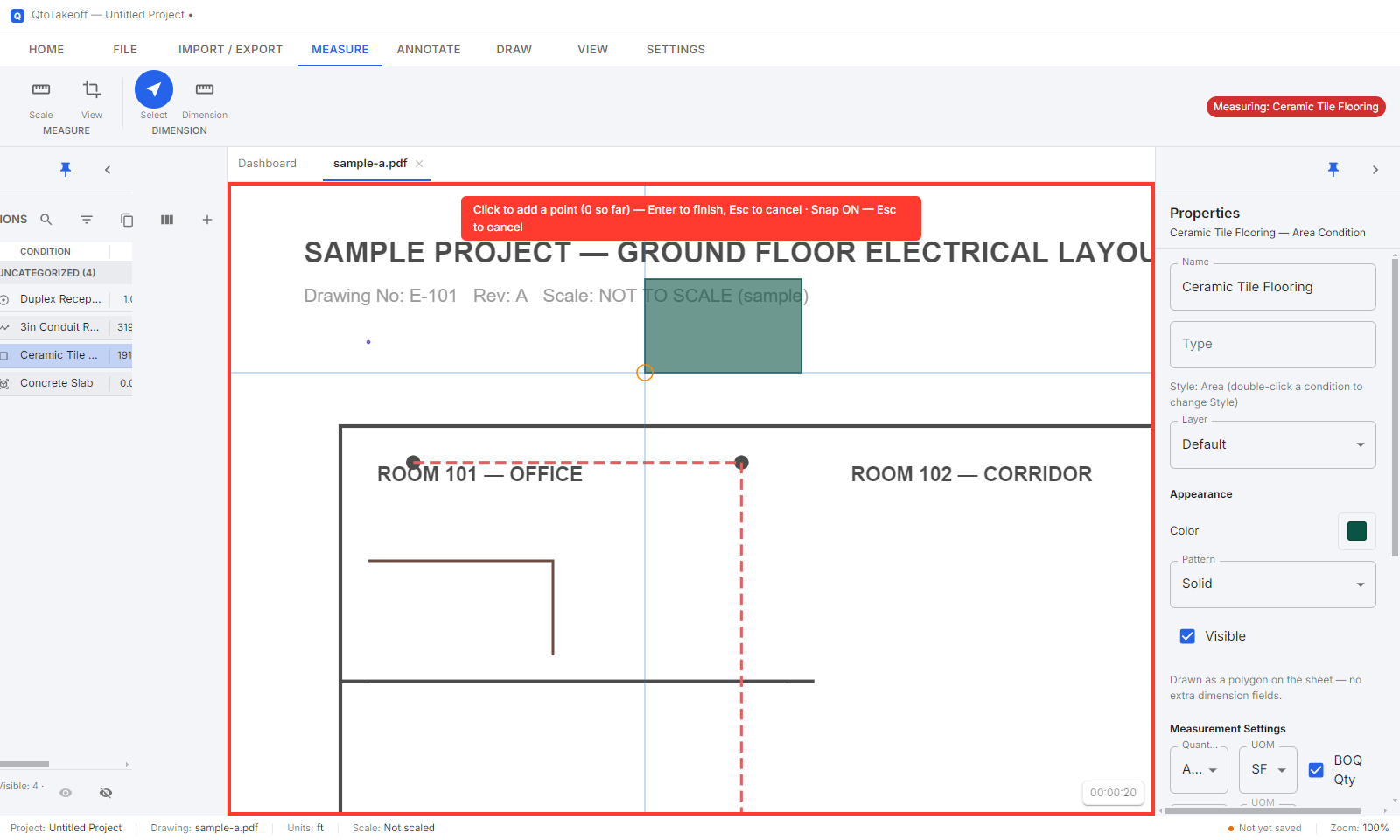
A finished Area takeoff — traced once, computed automatically
Efficiency
Built for estimators doing this all day
- ✓Import a full multi-page drawing set at once — each sheet keeps its own scale and DPI
- ✓Zones and Layers to organize and isolate a floor, discipline, or phase on large projects
- ✓Save a Condition list once — your item structure carries over to the next project
- ✓A full keyboard-shortcut set, built for hundreds of takeoff actions a day
- ✓Additional Views — zoom into a crowded detail at a different resolution without re-importing the sheet
Proof & Audit Trail
A number nobody has to take your word for
- ✓Marked-up PDF export — every marker, line, and shape burned directly into the drawing, ready for a client or consultant
- ✓Drawing Compare — a color-coded, pixel-level record of exactly what changed between two revisions
- ✓Everything lives inside the saved project file — reopen it months later and every measurement is still there
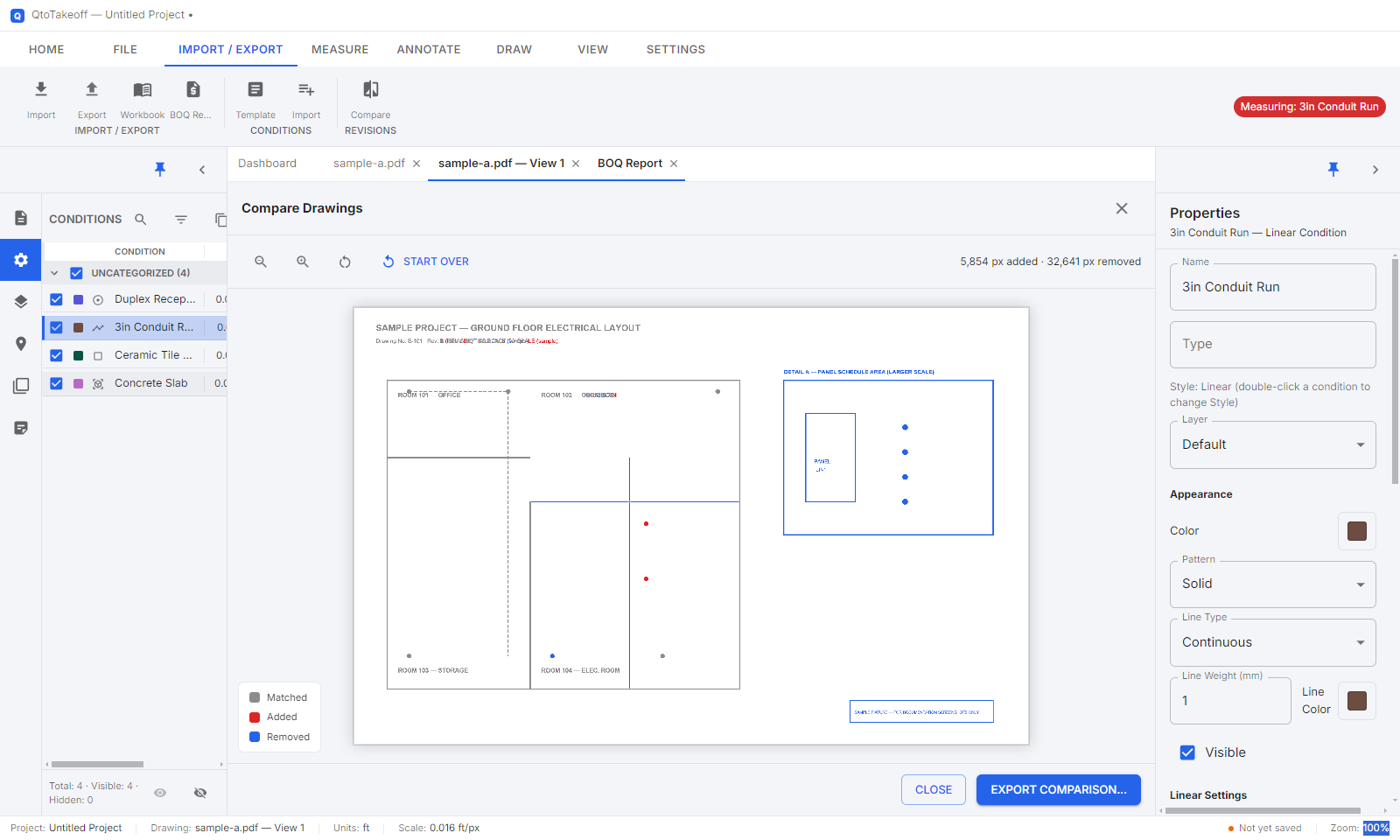
Drawing Compare — additions and deletions between two revisions, highlighted automatically
Exports
Numbers that leave the software in the shape you need them
- ✓CSV or a full Excel Workbook — quantities grouped by condition, ready for your own templates
- ✓Marked-up PDF — a visual record for client or consultant submissions
- ✓Choose exactly which sheets go into an export — nothing extra, nothing missing
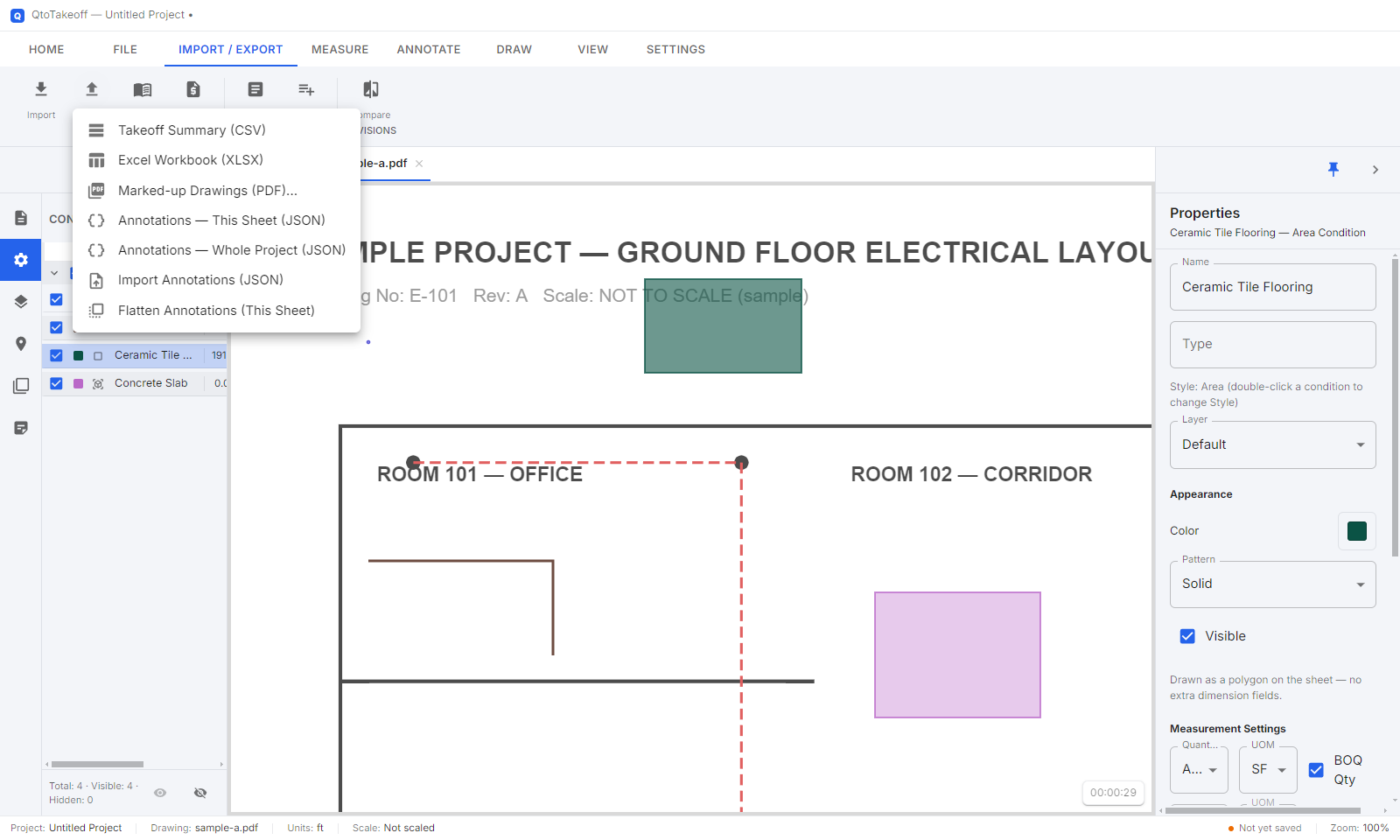
Every export, one menu
Export Samples
See the exports for yourself
Real output files, from a real takeoff — not mockups.
BOQ Preparation
From takeoff to Bill of Quantities, without leaving the drawing
| Description | Unit | Qty | Rate (₹) | Amount (₹) |
|---|---|---|---|---|
| 20mm dia. PVC conduit, surface mounted | LF | 1,240 | 45 | 55,800 |
| 6A modular switch, 1-way | EA | 86 | 120 | 10,320 |
| 2×2 LED panel light fixture | EA | 64 | 1,450 | 92,800 |
| Cable tray, 150×50mm incl. supports | LF | 310 | 380 | 117,800 |
| Grand Total | ₹276,720 | |||
Sample BOQ Report output — illustrative figures
- ✓Every BOQ line comes from the same conditions used for the takeoff — no re-keying, no second source of truth
- ✓Rate and Amount cells are editable, with spreadsheet-style formulas
- ✓Print or Save as PDF straight from the report, or export to Excel for further formatting
Built For How You Bill
Works the same way whether you bill by item or by lump sum
Item-Rate Contracts
Billing is a quantity × rate exercise — start with quantities you can defend.
- ✓Every running-account bill or interim certificate comes down to a measured quantity against a contract rate
- ✓The BOQ Report produces exactly that structure — Code, Description, Unit, Qty, Rate, Amount — straight from the same takeoff used to plan the work
- ✓The marked-up PDF export gives a certifying consultant a direct visual check against the measured quantity — fewer queries, faster certification
- ✓Re-measuring for a bill isn't a separate exercise — the numbers are already there
Lump-Sum Contracts
Risk sits at two moments — pricing, and every change after.
- ✓At tender: a fast, complete takeoff means the lump-sum price is built on drawings you actually measured — not a rushed visual estimate
- ✓After award: when a revised drawing arrives, Drawing Compare shows exactly what's new against the drawing the price was based on
- ✓Added scope in red, removed scope in blue — documentation for a variation claim, not a debate
- ✓Nothing about the originally priced drawing changes — the comparison is a separate, non-destructive review
Documentation
Everything the software does, in one place
A complete walkthrough of every feature — importing drawings, taking off quantities, BOQ reports, exports, and more. The same guide built into the app itself.
Summary
It's the same takeoff work — with less of the work
Time
Hours back every week, not just at deadline
Accuracy
Fewer manual steps between a measurement and a bill
Proof
Every number traceable to a mark on a drawing
Speed to bill
BOQ and exports ready the moment takeoff is
None of it requires learning a new way to read a drawing — just a faster, more provable way to measure the one you already have open.
Licensing
One license, every feature
No tiers to compare, nothing held back for a "Pro" plan — every license unlocks the full app. Try it free first (see Download below), then connect with us when you're ready — we'll get back to you with pricing and terms.
Connect to Get Full AccessGet The Software
Download QtoTakeoff, then get licensed in two emails
Both downloads are free to run and open straight into a limited demo — no account, no cloud, no card required to try it. Activating a full license afterward is a short, fully offline exchange with our team.
QtoTakeoff 3.5.0 · no install, just run the .exe · opens in Google Drive
QtoTakeoff Setup 3.5.0 · sets up Start Menu & desktop shortcuts · opens in Google Drive
How licensing works
- Open QtoTakeoff — no account or internet connection needed. It runs right away in a limited demo (1 sheet, 5 conditions, 25 measurements per project) so you can try it before activating anything.
- When you're ready to activate, click Activate License in the yellow bar at the top.
- Fill in your Name, Company, Email, Mobile, Country, and Address.
- Click Export Request File... — this saves a small file bundling your details with this computer's machine ID. Nothing to copy or read out by hand.
- Email that file to info@qtotakeoff.com.
- We review it and email back your license file.
- Click Already have a license file? Import it, pick the file we sent — you're activated immediately, no restart needed.
Licensing at a glance
- ✓No license needed to try it — every download opens straight into a working demo, no time limit to worry about
- ✓Fully offline — no account, no cloud, no internet connection required to activate
- ✓Machine-locked, not usage-tracked — your projects and drawings never leave your computer
- ✓Lifetime, Annual, Monthly, Trial, or a custom duration — whichever fits how you work
- ✓Licensing questions any time — just email info@qtotakeoff.com
Next Steps
See it on your own drawings
Bring a real sheet — a recent tender, a revised drawing, anything you'd normally take off by hand — and we'll walk through it together.